Your Apple Watch is Your Heart Rate Monitor
Broadcast your heart rate directly from your Apple Watch to Zwift via Bluetooth. No extra sensor needed. Just ride.
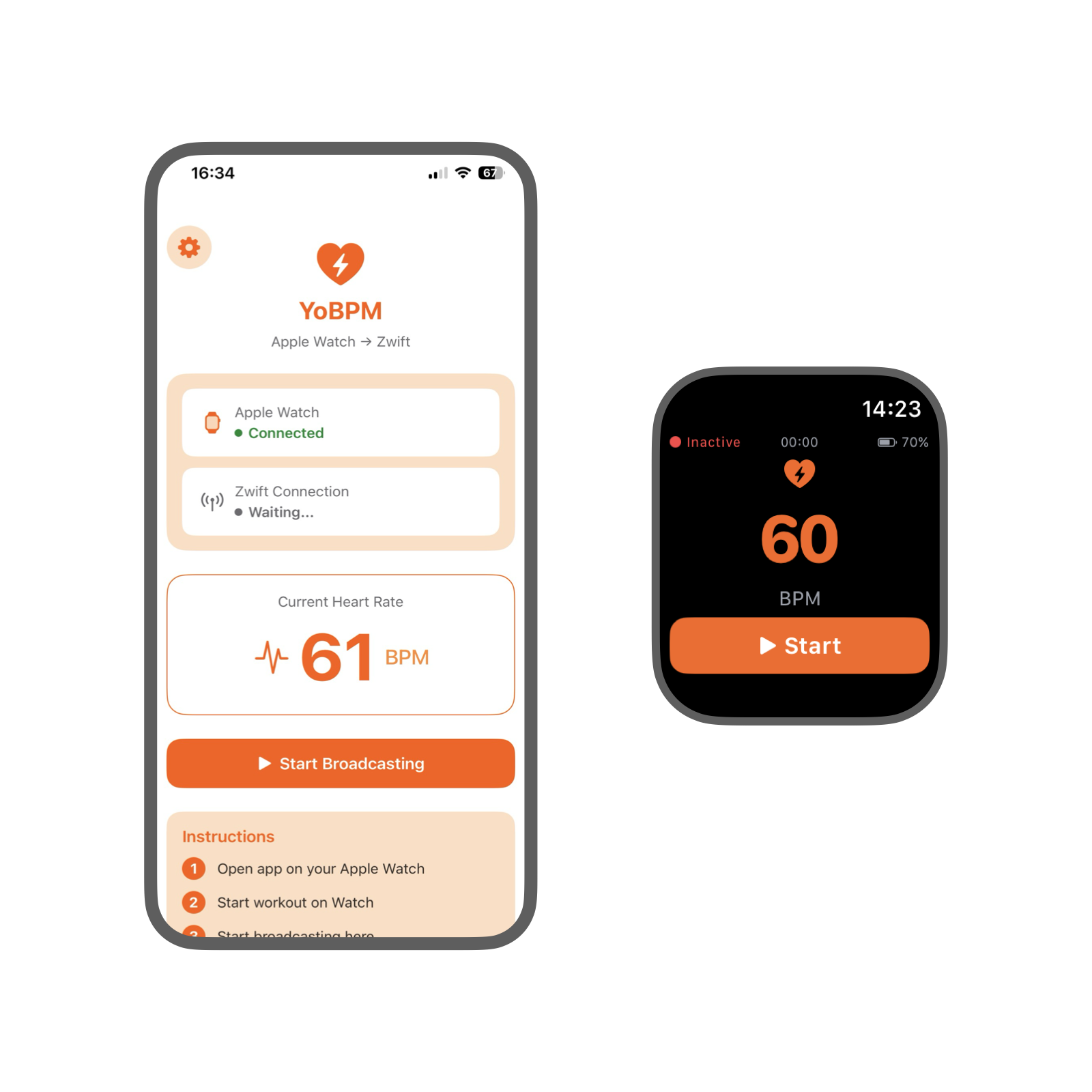
Broadcast your heart rate directly from your Apple Watch to Zwift via Bluetooth. No extra sensor needed. Just ride.
Everything you need to connect your Apple Watch heart rate to Zwift
Use the heart rate sensor already on your wrist. No need to buy an additional chest strap or arm band.
YoBPM broadcasts as a standard Bluetooth heart rate monitor. Zwift sees it just like any other HRM.

Connect in seconds. Start your workout on the watch, broadcast from your phone, and you're ready to ride.

Apple Watch optical heart rate sensor provides reliable readings for your indoor cycling sessions. Compare vs chest strap →
Optimized to minimize battery drain on both your iPhone and Apple Watch during long rides.
Keep broadcasting even when you switch to other apps or check notifications on your watch.
See your average heart rate and heart rate zones on the home screen and on the Lock Screen during the ride.
At the end of a ride, keep the workout in Apple Health or discard it.
Get started in less than a minute
Launch YoBPM on your Apple Watch and start a workout
Open YoBPM on iPhone and tap "Start Broadcasting"
In Zwift, pair "Your Phone name" as your heart rate monitor
Your heart rate now appears in Zwift. Enjoy your ride!
For YoBPM to work properly, please enable these permissions
 iPhone Permissions
Required to broadcast your heart rate to Zwift. Go to Settings → Bluetooth → Enable

Get alerts when your watch disconnects during a session
 Apple Watch Permissions
Required to read your heart rate data. Go to Settings → Health → Apps → YoBPM → Enable Heart Rate
Required to start a workout session. Enable in Health → Apps → YoBPM → Enable Workouts
Real reviews from the App Store
Finally! An app which allows the Apple Watch HRM to be used with other apps, such as Zwift and Biketerra. Consistently! Well done to the developer.
This made my dream of using my Apple watch for heart rate in Zwift come true!
Works flawlessly with myWhoosh, every other app I have tried doesn't show up for some reason. And shout out for having a purchase option, I hate subscriptions ❤️🚴
I found your app on Reddit after getting a smart bike trainer to use on Zwift. I couldn't figure out how to get my Apple Watch to connect to Zwift for the life of me but this app saved me after scrolling through multiple articles and subreddits. Worth every penny!!
I usually use the companion app on my phone to link my Apple Watch to Zwift, but this app also does it for Bitgym and (presumably) lots of other similar apps on my iPad and gym equipment. Works smoothly - well worth it to avoid needing a separate heart monitor when Apple Watch is not natively linked.
Everything you need to know about YoBPM
YoBPM works with Apple Watch Series 4 and newer running watchOS 10 or later. This includes Series 4, 5, 6, SE, 7, 8, 9, 10, and Ultra models.
Yes! Apple Watch uses advanced optical sensors that provide reliable heart rate data for most indoor cycling activities. While a chest strap may offer slightly more precision during very high intensity intervals, the Apple Watch is more than sufficient for most Zwift riders.
Yes! YoBPM broadcasts as a standard Bluetooth heart rate monitor, so it works with any app that can connect to Bluetooth HRM devices, including TrainerRoad, Rouvy, and others.
The Apple Watch reads your heart rate but cannot directly broadcast Bluetooth to other devices. The iPhone app receives the heart rate from your watch and broadcasts it as a Bluetooth heart rate monitor that Zwift can connect to.
1. Press and hold your watch face
2. Tap "Edit"
3. Swipe to the complications page
4. Tap a complication slot
5. Scroll and select "YoBPM"
6. Press the Digital Crown to save
Your iPhone needs to be within Bluetooth range of both your Apple Watch and the device running Zwift. We recommend keeping your phone near your trainer setup for the best connection reliability.
YoBPM is optimized for efficiency. During a typical 1-hour ride, expect about 10-15% battery drain on your Apple Watch (similar to any workout) and minimal impact on your iPhone battery.
7 days free, then $9.99 a year
Lifetime and weekly purchases already made stay active.
Download YoBPM now and start using your Apple Watch as a heart rate monitor for Zwift.
Download on App Store